LinkedIn Image Sizes Guide: Every Dimension You Need in 2026
March 19, 20264 min read
Profile Photo and Banner Dimensions
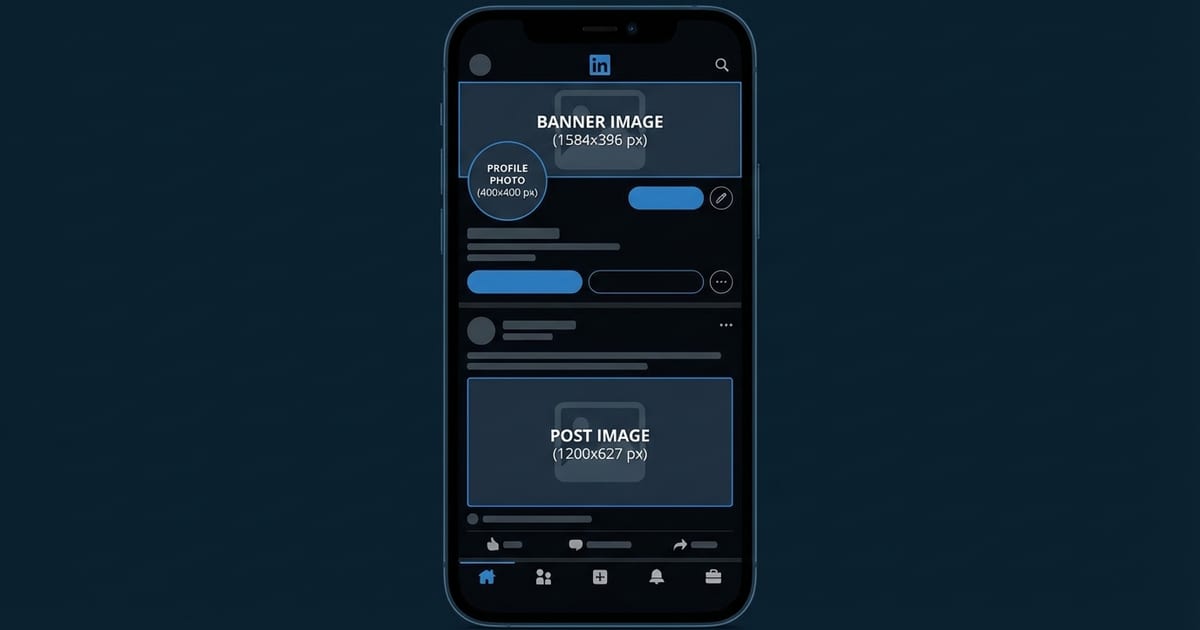
Your LinkedIn profile photo should be 400 x 400 pixels at minimum, though uploading at 800 x 800 pixels is recommended for sharpness on high-density screens. The photo is displayed as a circle, so keep your face or logo centered and avoid placing important elements near the corners where they will be cropped off.
Post and Article Image Sizes
Single-image posts perform best at 1200 x 627 pixels, which is the standard landscape format for LinkedIn feed posts. 91:1 aspect ratio fills the feed width on both desktop and mobile without cropping, ensuring your complete image is visible to viewers.
Company Page and Event Images
Company page logos should be 300 x 300 pixels, displayed as a square. The company cover image follows the same 1584 x 396 pixel dimensions as personal profile banners. For the Life tab on company pages, the main hero image should be 1128 x 376 pixels.
Preparing LinkedIn Images with ToolPic
Open ToolPic's Image Crop tool to resize your images to the exact LinkedIn dimensions. Select a custom aspect ratio or enter specific pixel values like 1200 x 627 for feed posts or 400 x 400 for profile photos. The crop tool lets you frame the most important part of your image precisely.